Showing posts with label Security. Show all posts
Showing posts with label Security. Show all posts
Sunday, July 15, 2007
Botnet Movie
There's a cool botnet introductory movie over at GOVCERT.NL (Computer Emergency Response Team for the Dutch Government).


Friday, June 22, 2007
"Change Your Password!" or Not?
Today I came across an article at the "Daily Cup of Tech" blog where the author urges you to frequently (every month or two) change your password(s). At first this may seem like a really good idea but I'll have to disagree. First of all let me point out some other password-related security guidelines.
One should never use the same password in all of his accounts. Should one of them be compromised, he is totally helpless. For example your password to a forum should never be the same as the password in the e-mail address you have provided during registration. Most people have two or three passwords and use one of them for their "most-secure" accounts, the second one for their e-mails and the third for every other "low-security" case. I'm not necessarily saying that's the best one can do. Also, passwords should be hard to guess (and therefore hard to remember). So a totally random combination of letters, numbers and symbols, longer or equal to 8 characters is a nice choice.
Let's get back to the article. Having at least three totally random passwords like "C9U6h#*U" or "swa!Es7u" is already a hard thing to do. Frequently changing them and therefore memorizing them every month or so is something nearly impossible for the average user. Too much effort can push one into writing down the password or storing in somewhere like on his cell phone. This is far worse than keeping the same password for a long time.
In my opinion, a secure-enough password is not in any danger from contemporary password-guessing techniques. The only way it can be compromised is if transmitted over an insecure medium, like a non-SSL HTTP session.
One should never use the same password in all of his accounts. Should one of them be compromised, he is totally helpless. For example your password to a forum should never be the same as the password in the e-mail address you have provided during registration. Most people have two or three passwords and use one of them for their "most-secure" accounts, the second one for their e-mails and the third for every other "low-security" case. I'm not necessarily saying that's the best one can do. Also, passwords should be hard to guess (and therefore hard to remember). So a totally random combination of letters, numbers and symbols, longer or equal to 8 characters is a nice choice.
Let's get back to the article. Having at least three totally random passwords like "C9U6h#*U" or "swa!Es7u" is already a hard thing to do. Frequently changing them and therefore memorizing them every month or so is something nearly impossible for the average user. Too much effort can push one into writing down the password or storing in somewhere like on his cell phone. This is far worse than keeping the same password for a long time.
In my opinion, a secure-enough password is not in any danger from contemporary password-guessing techniques. The only way it can be compromised is if transmitted over an insecure medium, like a non-SSL HTTP session.
Friday, May 18, 2007
Schneier: Airline Security Cartoon
Saturday, May 12, 2007
Schneier: Is Big Brother a Big Deal?
Is Big Brother a Big Deal?
From the article:
Big Brother isn't what he used to be. George Orwell extrapolated his totalitarian state from the 1940s. Today's information society looks nothing like Orwell's world, and watching and intimidating a population today isn't anything like what Winston Smith experienced.
From the article:
Big Brother isn't what he used to be. George Orwell extrapolated his totalitarian state from the 1940s. Today's information society looks nothing like Orwell's world, and watching and intimidating a population today isn't anything like what Winston Smith experienced.
Wednesday, May 09, 2007
When you think you know what you don't know...
I was attending a Legal Issues on E-Commerce lecture yesterday and I was amazed by the superficial knowledge of the audience on security matters. Being totally ignorant is something I understand, since they may have never had the chance to learn about it, but believing you know about it when you don't is absolutely disappointing.
So we were talking about digital signatures on e-mails and online transactions in general and a guy claimed that when you apply for an e-mail address and give out your name and address, it is the provider's obligation to verify that info and therefore when you get a mail from someone you really should trust its source (yeap, the "From:" field). Can you believe it?
OK, maybe he has never heard of spoofing an e-mail address or taking over ones account but how can he be so sure of the facts to argue that an electronic message coming through a "known and well-respected" provider's network is something you can trust?
Anyhow, here are some Wikipedia links concerning Digital Signatures, Electronic Signatures (totally different object) and Public-Key Certificates.
So we were talking about digital signatures on e-mails and online transactions in general and a guy claimed that when you apply for an e-mail address and give out your name and address, it is the provider's obligation to verify that info and therefore when you get a mail from someone you really should trust its source (yeap, the "From:" field). Can you believe it?
OK, maybe he has never heard of spoofing an e-mail address or taking over ones account but how can he be so sure of the facts to argue that an electronic message coming through a "known and well-respected" provider's network is something you can trust?
Anyhow, here are some Wikipedia links concerning Digital Signatures, Electronic Signatures (totally different object) and Public-Key Certificates.
Wednesday, February 21, 2007
Auditing Wi-Fi Areas.
I've always been curious about the kind of security applied in “Hot Spots” or “Wi-Fi Areas”. These are places where you can access the Internet on pre-paid time. I'm not even going to talk about securing the client's activities and data or providing any kind of anonymity. I was really keen on finding what means such providers have deployed to make sure no unauthorized personnel has access (aka people who haven't paid for their time). So today was my lucky day. While waiting for a flight at Athens International Airport I had the chance to test their Wireless Internet Access Service. Apparently they don't use any kind of encryption on their Access Points. That means anyone can connect to it and receive an IP Address through DHCP (Dynamic Host Configuration Protocol). That's good right? These guys want even the least tech savvy user to be their client. As soon as you try to access your first web site (I'm guessing they offer HTTP only), you are redirected (through a transparent proxy) to a login screen and asked for a PIN which can be found on the back of pre-paid cards. When you enter a valid PIN, (I'm guessing) your IP and/or MAC Address are recorded and their firewall let's you out (or your proxy fetches stuff for your or something like that). So, that's how it works.
Let's say I am a bad guy, well not a bad guy – just a guy who doesn't want to pay. I would go and sit next to a guy who is already surfing, sniff the unencrypted air to easily discover the legit user's IP and MAC Addresses. (Of course I could also sniff sensitive information such as his passwords or e-mails but that's another story.) After that would I configure my own wireless card to use the exact same information (hence masquerading my self as the legit user) and I'm in! That's it! I wouldn't even have to try to find holes in their firewall or crack their infrastructure or brute force PINs. Pretty easy huh? Well, it is.
Then I tried to understand it. First of all their administrator has applied no access control mechanisms to the Access Point because that would require a significant trade-off. It would require every user to know how to configure his wireless device to conform with those security systems (e.g. MAC Filtering, Hidden ESSID, WEP, WPA). This could scare away potential customers who just don't get along with computers very well and the CEOs don't want that. So no “frustrating” security measures.
OK so a lot of people can get it for free. We know it and they know it. Although at first it may seem that a bandwidth piggyback is so cool and let's you surf for free, it actually works in their favor. How?
First of all, including the piggybackers, more people will appear using their Wi-Fi Areas. And, as we all know, people tend to imitate other people's behavior. So if you have a wireless-capable device and see other people using such service you will also feel the urge to use it. So there you have, indirect advertisement! Moreover, people able to perform such stunt will be so proud of themselves that will tell their friends about it. And when their friends try to do it for themselves they may fail but they were expecting Internet Access on the spot so it is very likely they will actually pay for the service after all. Extending that, there will be a time the original hacker won't be able to find victims to take advantage of but going online from the airport may already have become a habit to him or somehing he relies on so even he may purchase credits for the service. Also, if you come to think about it, they providers aren't losing that much. Most users (even unauthorized ones) are there to catch a flight so under normal circumstances that won't take more than a couple of hours. It's not like they are stealing bandwidth for days or so.
To sum up, what is advertised and offered, is Internet Access to counteract those long waiting hours or allow one urgent e-mail to be sent or a short chat to be conducted. In other words it addresses the need for communication, something people are always willing to pay (a lot) for. The generics of this, who pays for it, who doesn't, how secure and reliable it is, are not considered (although they should be) important both by the provider and the majority of users so everyone is happy at the end of the day.
Let's say I am a bad guy, well not a bad guy – just a guy who doesn't want to pay. I would go and sit next to a guy who is already surfing, sniff the unencrypted air to easily discover the legit user's IP and MAC Addresses. (Of course I could also sniff sensitive information such as his passwords or e-mails but that's another story.) After that would I configure my own wireless card to use the exact same information (hence masquerading my self as the legit user) and I'm in! That's it! I wouldn't even have to try to find holes in their firewall or crack their infrastructure or brute force PINs. Pretty easy huh? Well, it is.
Then I tried to understand it. First of all their administrator has applied no access control mechanisms to the Access Point because that would require a significant trade-off. It would require every user to know how to configure his wireless device to conform with those security systems (e.g. MAC Filtering, Hidden ESSID, WEP, WPA). This could scare away potential customers who just don't get along with computers very well and the CEOs don't want that. So no “frustrating” security measures.
OK so a lot of people can get it for free. We know it and they know it. Although at first it may seem that a bandwidth piggyback is so cool and let's you surf for free, it actually works in their favor. How?
First of all, including the piggybackers, more people will appear using their Wi-Fi Areas. And, as we all know, people tend to imitate other people's behavior. So if you have a wireless-capable device and see other people using such service you will also feel the urge to use it. So there you have, indirect advertisement! Moreover, people able to perform such stunt will be so proud of themselves that will tell their friends about it. And when their friends try to do it for themselves they may fail but they were expecting Internet Access on the spot so it is very likely they will actually pay for the service after all. Extending that, there will be a time the original hacker won't be able to find victims to take advantage of but going online from the airport may already have become a habit to him or somehing he relies on so even he may purchase credits for the service. Also, if you come to think about it, they providers aren't losing that much. Most users (even unauthorized ones) are there to catch a flight so under normal circumstances that won't take more than a couple of hours. It's not like they are stealing bandwidth for days or so.
To sum up, what is advertised and offered, is Internet Access to counteract those long waiting hours or allow one urgent e-mail to be sent or a short chat to be conducted. In other words it addresses the need for communication, something people are always willing to pay (a lot) for. The generics of this, who pays for it, who doesn't, how secure and reliable it is, are not considered (although they should be) important both by the provider and the majority of users so everyone is happy at the end of the day.
Tuesday, January 30, 2007
Imbalanced (IMBA) Corporate Security.
It seems that both corporate networks and their physical installations may be compromised because of some irresponsible security officer.
When we are talking about security (at a corporate level) we imagine an area (or multiple areas) where only certain people are allowed in. And once they are in, they are divided into groups depending on what they are meant to do in that area. That area may be a physical location (office/building). In there, only the company employes are granted entry priviledges. Once they are in, each one works in his own cubicle and only senior employes wonder around checking everybody else. This is the same when it comes to an electronic network: you have different areas (subnet A, subnet B, etc) and different kinds of permissions (server 1 access, server 2 access, etc).
Security officers are mostly concerned about letting people in. When a new guy is hired they screen him and watch him for a while before granting him appropriate permissions. The problem is that administrators are selfish creatures. If they say you are "OK", that's it. They never check up on you or re-evaluate their decision.
This is bad enough but the problem starts when they forget about you even when you leave the company for ever. As a result, active accounts of ex-employees remain in the system allowing them access at any time. This is huge! It only takes an unhappy ex-employee with the appropriate privileges and maybe a little hacking to enable stealing or destroying information or damaging the infrastructure itself.
It's been over a year since Bob left the company his was working at. A few days ago he realized that his network access had NOT been revoked (and - I bet- neither had his physical privileges, alarm codes etc). He was able to remotely access specific systems from the company network and gain administrative privileges. He could install backdoors in those systems to ensure future access. He could use those systems to attack others, sniff the inside of the company's network (firewalls are of no use in this case) and basically do a lot of nasty things. Also he could take advantage of small security vulnerabilities he had knowledge of (like the fact that they used the same local admin password on every PC) to cover his tracks and hide his identity. Taking it a little bit further and under the assumption that nobody bothered to cancel his alarm code (they took his key through), it would be possible to invade the premises during the night, disarm the alarm using his code (or any other ex-colleague code his knows - this is another big issue) and steal/damage anything he wanted.
As Bob told me, it took 3 months since the day he started working there to get a key for the front door and remote access privileges. Apparently the security officer wanted to make sure he was not some malicious person. What worries me thought is that he took all that time to verify Bob (while making his life harder since he was an employ and did not have sufficient means/privileges to do his job) but still, 12 months since his last day at work, Bob's clearance hasn't been revoked. It's safe to assume that this is not an one-time event. Unfortunately it is my belief that there a lot of "orphan" accounts in the system.
This rises a couple more risks. Let's assume that Jane is also an ex-employee but isn't as cunning as Bob. She has never thought of doing any of the stuff I've just talked about. Jane's account is still active though and is protected by a very easy password. When the sysadm tries to enforce a new (better?) password policy he will not look after Jane's account because Jane is not working there any more. Right? Wrong! Maybe all 999 employees have updated their accounts with hard-to-guess, complex passwords. It takes a single account, Jane's, with a dumb password like "janedoe47" for an attacker to infiltrate the network.
Loose privileges are a liability!
To sum up, securing a physical area or a network means analyzing every possible scenario and providing general cover and failsafes and not just focusing on the "front door". Because that's where an attacker will try to gain access. He will hit weak abandoned accounts with weak passwords, forgotten remote privileges and protocols that should have been revoked.
When we are talking about security (at a corporate level) we imagine an area (or multiple areas) where only certain people are allowed in. And once they are in, they are divided into groups depending on what they are meant to do in that area. That area may be a physical location (office/building). In there, only the company employes are granted entry priviledges. Once they are in, each one works in his own cubicle and only senior employes wonder around checking everybody else. This is the same when it comes to an electronic network: you have different areas (subnet A, subnet B, etc) and different kinds of permissions (server 1 access, server 2 access, etc).
Security officers are mostly concerned about letting people in. When a new guy is hired they screen him and watch him for a while before granting him appropriate permissions. The problem is that administrators are selfish creatures. If they say you are "OK", that's it. They never check up on you or re-evaluate their decision.
This is bad enough but the problem starts when they forget about you even when you leave the company for ever. As a result, active accounts of ex-employees remain in the system allowing them access at any time. This is huge! It only takes an unhappy ex-employee with the appropriate privileges and maybe a little hacking to enable stealing or destroying information or damaging the infrastructure itself.
It's been over a year since Bob left the company his was working at. A few days ago he realized that his network access had NOT been revoked (and - I bet- neither had his physical privileges, alarm codes etc). He was able to remotely access specific systems from the company network and gain administrative privileges. He could install backdoors in those systems to ensure future access. He could use those systems to attack others, sniff the inside of the company's network (firewalls are of no use in this case) and basically do a lot of nasty things. Also he could take advantage of small security vulnerabilities he had knowledge of (like the fact that they used the same local admin password on every PC) to cover his tracks and hide his identity. Taking it a little bit further and under the assumption that nobody bothered to cancel his alarm code (they took his key through), it would be possible to invade the premises during the night, disarm the alarm using his code (or any other ex-colleague code his knows - this is another big issue) and steal/damage anything he wanted.
As Bob told me, it took 3 months since the day he started working there to get a key for the front door and remote access privileges. Apparently the security officer wanted to make sure he was not some malicious person. What worries me thought is that he took all that time to verify Bob (while making his life harder since he was an employ and did not have sufficient means/privileges to do his job) but still, 12 months since his last day at work, Bob's clearance hasn't been revoked. It's safe to assume that this is not an one-time event. Unfortunately it is my belief that there a lot of "orphan" accounts in the system.
This rises a couple more risks. Let's assume that Jane is also an ex-employee but isn't as cunning as Bob. She has never thought of doing any of the stuff I've just talked about. Jane's account is still active though and is protected by a very easy password. When the sysadm tries to enforce a new (better?) password policy he will not look after Jane's account because Jane is not working there any more. Right? Wrong! Maybe all 999 employees have updated their accounts with hard-to-guess, complex passwords. It takes a single account, Jane's, with a dumb password like "janedoe47" for an attacker to infiltrate the network.
Loose privileges are a liability!
To sum up, securing a physical area or a network means analyzing every possible scenario and providing general cover and failsafes and not just focusing on the "front door". Because that's where an attacker will try to gain access. He will hit weak abandoned accounts with weak passwords, forgotten remote privileges and protocols that should have been revoked.
Sunday, January 28, 2007
Sunday, December 31, 2006
Bringing down the house.
There have been so many action movies where the use of access tokens is demonstrated. They really are small devices which usually provide a long string of numbers, which periodically changes and only the device owner knows about it. Therefore it must be the ultimate form of secure authentication. Right?
Well, it's not a bad idea to start with. The problem is that humans are always involved in the process. Like an IT Security director who suggested users should attach their personal access token on the computer they are using to prevent them from misplacing it. OMG. It's like using a sticker with your username and password on top of the screen, version 2.0.
Well, it's not a bad idea to start with. The problem is that humans are always involved in the process. Like an IT Security director who suggested users should attach their personal access token on the computer they are using to prevent them from misplacing it. OMG. It's like using a sticker with your username and password on top of the screen, version 2.0.
As you can understand the system itself may be sufficiently secure but the way it is deployed and used may severely counteract its benefits.
P.S.: And of course there have been and always will be stupid people :P
P.S.: And of course there have been and always will be stupid people :P
Friday, December 22, 2006
Putting emotions aside.
Today I was talking to a friend of mine about a project I'm working on and the PKI in general. We analyzed the current issues concerning end-user security, whether it's an ATM PIN or a website's login. We agreed that the common one-factor (password) authentication is just about to expire. The world needs something better and by this I don't mean "stronger" passwords because this usually increases the complexity of the token one has to remember, therefore compromising the safety of the system. So we were sitting there, drinking coffee, talking about it and suddenly my friend said:
When it comes to security, emotion must get out of the way.
By that he meant that we should eliminate the human factor. The actual words he used were so interesting that I thought they were worth mentioning here. He spontaneously revealed the reason humans are the always the weakest link in a security chain. It's not because they can't count high enough or work 24/7. It's because they have emotions that can drive them out of logic's way and make them do things they will later regret.
Those emotions will make them "help out" a beautiful girl, sympathize for someone pretending to be their colleague or express unreasonable behavior under fear or stress.
By eliminating the human factor we eliminate fraud (OK, maybe that's not entirely true). Computer's never doubt. Their decision making mechanism is binary, something is one or zero, true or false.
Of course computers are products of humans so there you have it again, the human factor. So maybe it's not that easy to get rid of it but surely can contain it in groups of specialized people.
It's one thing having a security expert taking care of your safety and quite another You being solely responsible for it.
So the next time you read a security policy for a service, search for the You-Are-Responsible-For-The-Safety-Of-Your-Account paragraph. Don't accept it and look for something more serious.
When it comes to security, emotion must get out of the way.
By that he meant that we should eliminate the human factor. The actual words he used were so interesting that I thought they were worth mentioning here. He spontaneously revealed the reason humans are the always the weakest link in a security chain. It's not because they can't count high enough or work 24/7. It's because they have emotions that can drive them out of logic's way and make them do things they will later regret.
Those emotions will make them "help out" a beautiful girl, sympathize for someone pretending to be their colleague or express unreasonable behavior under fear or stress.
By eliminating the human factor we eliminate fraud (OK, maybe that's not entirely true). Computer's never doubt. Their decision making mechanism is binary, something is one or zero, true or false.
Of course computers are products of humans so there you have it again, the human factor. So maybe it's not that easy to get rid of it but surely can contain it in groups of specialized people.
It's one thing having a security expert taking care of your safety and quite another You being solely responsible for it.
So the next time you read a security policy for a service, search for the You-Are-Responsible-For-The-Safety-Of-Your-Account paragraph. Don't accept it and look for something more serious.
Thursday, December 21, 2006
Passwords in the hands of users.
I've talked a couple of times about passwords, how strong they should be, how to strengthen them for that matter, etc. But when it comes to the average user what does he use as a password and how does he understand the whole concept?
There's an interesting article by Bruce Schneier on his weblog. The moment I saw it I had a deja vu. At first I quickly searched through this blog to see if I've already talked about it but no. So I guess it's because this is a constant issue that's been around for years.
The article is based on a research done by some guys who set up a fake MySpace login site and harvested actual user passwords. Then they ran a couple of tests on them and presented the results.
So 23% and 25% of them where 7 and 8 characters long which is good, meaning that people have realized that just because your password is secret to everyone else doesn't mean it has to be three letters long since the attacker can always start guessing.
Also, an impressive 81% are using both letters and numbers although 28% of them are just lowercase letters followed by a single digit. That might have been sufficient enough if over 90% of them weren't dictionary words or names followed by a number like "book2", "label7", etc.
Finally, the most common password was "password1" which is relatively good considering that a few years back it was just "password". So things are slowly getting better :)
At this point I feel obligated to rise a question: do we need stronger passwords or just an alternative to all of this?
Think about it. I'll get back on this...
There's an interesting article by Bruce Schneier on his weblog. The moment I saw it I had a deja vu. At first I quickly searched through this blog to see if I've already talked about it but no. So I guess it's because this is a constant issue that's been around for years.
The article is based on a research done by some guys who set up a fake MySpace login site and harvested actual user passwords. Then they ran a couple of tests on them and presented the results.
So 23% and 25% of them where 7 and 8 characters long which is good, meaning that people have realized that just because your password is secret to everyone else doesn't mean it has to be three letters long since the attacker can always start guessing.
Also, an impressive 81% are using both letters and numbers although 28% of them are just lowercase letters followed by a single digit. That might have been sufficient enough if over 90% of them weren't dictionary words or names followed by a number like "book2", "label7", etc.
Finally, the most common password was "password1" which is relatively good considering that a few years back it was just "password". So things are slowly getting better :)
At this point I feel obligated to rise a question: do we need stronger passwords or just an alternative to all of this?
Think about it. I'll get back on this...
Tuesday, December 05, 2006
Should Viruses Threaten Us?
 The last time I, and anyone I know, was infected by a computer virus it was almost 10 years ago when 1,44MB (3,5'') diskettes where in fashion. Back then, viruses where a true menace since the Internet was not popular enough and the most common file exchange method where these diskettes. At the same time Anti-virus programs had not yet proven their necessity and as a result, a single diskette (used as a means of file transfer) could infect many many computers.
Users trusted a diskette from a person simply because they trusted the person. That was totally wrong since they couldn't really know where it had been before. And without an Anti-virus or any experience on the matter they could, without knowing, use an infected computer and possibly infect others simply by sharing their files with them. It really was like the human HIV virus. The was a big problem.
Since then, many things have changed. For starters, most computers don't have 3,5'' drives any more! Of course there's the Internet which is an even worse potential point of infection since you are practically exchanging files with the entire planet but one would expect computers users had grown wiser.
In our modern world where computers come with pre-installed Anti-virus systems is it acceptable for the average user to be infected or, worse, to infect others?
Today a friend of mine was telling me how his PC got infected by an .mp3 file someone gave him. What it did was create a hidden folder every time that file was played and fill that folder with random data over and over until it took up all the space left in his hard disk. He had to format the disk and install everything from scratch to fix it. He also mentioned another case where a virus cloned itself at runtime and consumed all the CPU time, thous making the system freeze. Rebooting didn't help him since it loaded itself during boot. He had to format the disk again.
While he was talking to me I couldn't help thinking "is this right? is this supposed to happen?". I mean, for a moment I thought I was 10 years in the past exchanging diskettes. I really couldn't believe that a computer user in the year 2006 did not have an Anti-Virus system installed and, worse, that a large computer users group did not shield themselves against such old and common threats.
From what I understood he didn't care much about the incident and, in his mind, thought of this as a totally normal thing because "computers break" and you have to "format them quite often to keep them in shape". Is he mad?! First of all, formatting your master hard drive should be the absolutely last choice you have and, frankly, I can't really think of a problem that demands this kind of solution. Secondly, I can't get over this belief that computers are "mysterious machines that may refuse to start or work properly for no reason". I believe we had almost two decades to familiarize with them so if you feel funny around computers maybe you are falling behind. Try to keep up!
In my little Utopian mind I picture a world where no viruses are left lying around just because everyone is keeping them out of their PC.
Sadly viruses are out there and are more mean and destructive as ever and we've simply forgotten about them. We feel safe when we shouldn't. We may not hear about them or see them before us simply because they are in hibernation. The first chance they get though, we'll know they are there the nasty way.
To sum up, unfortunately we haven't gotten rid of viruses so it's better to keep an eye for them since all it takes is a low-tech piece of code that will get you in trouble when you least expect it. Things can change and will change as soon as we treat our computers with responsibility and understanding.
P.S.: This page has been scanned for known viruses and found clean :)
Monday, December 04, 2006
Why Passwords are a Bad Idea...
BBC News has an interesting article on how passwords may weaken our security by far.
It goes on saying that, according to the UK's International Telecommunications Union, people nowadays have so many passwords to remember for so many different places that they inevitably start re-using the same keys again and again (in the worst case of all, the same password is applied to all authorization queries). As a result, it is quite easy to compromise a man's electronic identity (his online accounts to forums, commercial and banking services, e-mail, etc) just by cracking one or two of his codes (which may also be easy to guess - don't forget about brute forcing and common words). And of course many variant schemes may be seen here. For example if an e-mail account is compromised and the attacker uses the "remind my password" feature to all web sites the user is subscribed in, there's a great portion of them that will return the actual code is clear text via e-mail.
So there you have it, passwords are making people's life hard and at the same time increasing their sense of insecurity. They can't remember all of them! So they start writing them down on a piece of paper which they keep inside their wallet. Or they use (common passwords) their birthday or license plates' number and in general they violate one-by-one all keeping-passwords-safe rules.
And I'm wondering, is it time to move forward to something else? And if yes, what might that be?
Let's consider PKI for a moment. It stands for Public Key Infrastructure. I won't get into too many details here (maybe another time). Just thing of this as a system where all you need is a smart card (looks like a credit card) which holds all your information (identification, license, commercial and banking accounts, private keys). This card is password-protected so you do have to remember one password. Maybe there'll be a next version where there is no password and a biometric sensor protects the card's contents.
Anyway, with a single smart card you can exchange, through secure software, all the necessary authentication info with your e-mail provider (to access your messages), your bank (to check and manage your balance), e-commerce sites (shop online and all) and of course any other place on the WWW in which you need to properly identify yourself in order to gain access.
While some may think of this as a bad idea because all your keys are in one place, a single card - aka single point of failure, which is easy to be stolen and / or compromised. Well that's not exactly true. The card itself is very secure. Yes, someone may steal it from you since it is a physical item but it is highly unlikely he will ever be able to access its contents. So your secrets are safe and your life a lot easier.
After all, strengthening security should never be towards the end-user.
This will make things difficult for him and cause him to compromise his own identity. The PKI concept really means for the end-user to have a single card in his pocket which he must use upon login and take away upon logout. As simple as that and everybody is happy :)
This is a big issue and I'll get back on this sometime soon.
Bottomline, forget about passwords!
It goes on saying that, according to the UK's International Telecommunications Union, people nowadays have so many passwords to remember for so many different places that they inevitably start re-using the same keys again and again (in the worst case of all, the same password is applied to all authorization queries). As a result, it is quite easy to compromise a man's electronic identity (his online accounts to forums, commercial and banking services, e-mail, etc) just by cracking one or two of his codes (which may also be easy to guess - don't forget about brute forcing and common words). And of course many variant schemes may be seen here. For example if an e-mail account is compromised and the attacker uses the "remind my password" feature to all web sites the user is subscribed in, there's a great portion of them that will return the actual code is clear text via e-mail.
So there you have it, passwords are making people's life hard and at the same time increasing their sense of insecurity. They can't remember all of them! So they start writing them down on a piece of paper which they keep inside their wallet. Or they use (common passwords) their birthday or license plates' number and in general they violate one-by-one all keeping-passwords-safe rules.
And I'm wondering, is it time to move forward to something else? And if yes, what might that be?
Let's consider PKI for a moment. It stands for Public Key Infrastructure. I won't get into too many details here (maybe another time). Just thing of this as a system where all you need is a smart card (looks like a credit card) which holds all your information (identification, license, commercial and banking accounts, private keys). This card is password-protected so you do have to remember one password. Maybe there'll be a next version where there is no password and a biometric sensor protects the card's contents.
Anyway, with a single smart card you can exchange, through secure software, all the necessary authentication info with your e-mail provider (to access your messages), your bank (to check and manage your balance), e-commerce sites (shop online and all) and of course any other place on the WWW in which you need to properly identify yourself in order to gain access.
While some may think of this as a bad idea because all your keys are in one place, a single card - aka single point of failure, which is easy to be stolen and / or compromised. Well that's not exactly true. The card itself is very secure. Yes, someone may steal it from you since it is a physical item but it is highly unlikely he will ever be able to access its contents. So your secrets are safe and your life a lot easier.
After all, strengthening security should never be towards the end-user.
This will make things difficult for him and cause him to compromise his own identity. The PKI concept really means for the end-user to have a single card in his pocket which he must use upon login and take away upon logout. As simple as that and everybody is happy :)
This is a big issue and I'll get back on this sometime soon.
Bottomline, forget about passwords!
Saturday, November 18, 2006
RFID Passports Cracked
It seems that the new uber-secure RFID Passports issued by many European countries after pressure from the U.S. are not that secure after all.
RFID Passports are ordinary-looking passports containing, besides the "human readable" information and authenticity signs, a Radio-Frequency Identification Chip which stores all printed information (and more) and transmits them to wireless readers used at Border Control. The reason for the chip's existence is that it is considered (or at least was) impossible to copy or forge so that even if a malicious person managed to reproduce the actual document he would never make it in producing a valid chip to complete the passport.
So one could ask "what if I buy an RF Reader for $9.99?". Well, authorities are using the 3DES encryption algorithm to encrypt the information on the chip. It is currently considered an above average method, providing 112 bit effective security.
The problem starts with the (known) fact that three public pieces of information are used to build the encryption key: (in the exact order) the passport's serial number + the owner's birth date + the passport's expiry date. So... you don't have to attack the encryption! Just find out (pretty easily) that kind of information and you have yourself the actual encryption/decryption key. Then you can go home, in your garage and clone or modify the chip's contents.
This is very much disturbing since the whole purpose for the new passports was the security provided by that chip but it turns out there are a few wide cracks in it.
[...]
Another problem with these passports is that they transmit in the air and that they are (normally) unique. So... one could identify you by placing an RF Reader inside a dumpster that you walk by every day. And maybe place a bomb inside that would go off if you and only you be in proximity.
Of course, official authorities have issued passports sleeves that act as "RF shields". According to this the chip cannot be read from inside that sleeve and you only take it out just before the police checkpoint. Well, it has been demonstrated that even then, the chip can be read. You just have to be really close to the subject. Doesn't seem like a problem when you are packed up against each other in a crowded area like the subway or a huge waiting line in the airport.
To sum up, current government efforts to control foreigners in their countries seem like panicked maneuvers of a nation under attack. If they feel that way, then somebody should admit it and then maybe we can all go home at toss those e-passports away (maybe shred them and burn them just to be safe).
And for the last time, just leave cryptographers to deal with cryptography issues!
Committee members are excellent at screwing it all up.
Goodnight.
RFID Passports are ordinary-looking passports containing, besides the "human readable" information and authenticity signs, a Radio-Frequency Identification Chip which stores all printed information (and more) and transmits them to wireless readers used at Border Control. The reason for the chip's existence is that it is considered (or at least was) impossible to copy or forge so that even if a malicious person managed to reproduce the actual document he would never make it in producing a valid chip to complete the passport.
So one could ask "what if I buy an RF Reader for $9.99?". Well, authorities are using the 3DES encryption algorithm to encrypt the information on the chip. It is currently considered an above average method, providing 112 bit effective security.
The problem starts with the (known) fact that three public pieces of information are used to build the encryption key: (in the exact order) the passport's serial number + the owner's birth date + the passport's expiry date. So... you don't have to attack the encryption! Just find out (pretty easily) that kind of information and you have yourself the actual encryption/decryption key. Then you can go home, in your garage and clone or modify the chip's contents.
This is very much disturbing since the whole purpose for the new passports was the security provided by that chip but it turns out there are a few wide cracks in it.
[...]
Another problem with these passports is that they transmit in the air and that they are (normally) unique. So... one could identify you by placing an RF Reader inside a dumpster that you walk by every day. And maybe place a bomb inside that would go off if you and only you be in proximity.
Of course, official authorities have issued passports sleeves that act as "RF shields". According to this the chip cannot be read from inside that sleeve and you only take it out just before the police checkpoint. Well, it has been demonstrated that even then, the chip can be read. You just have to be really close to the subject. Doesn't seem like a problem when you are packed up against each other in a crowded area like the subway or a huge waiting line in the airport.
To sum up, current government efforts to control foreigners in their countries seem like panicked maneuvers of a nation under attack. If they feel that way, then somebody should admit it and then maybe we can all go home at toss those e-passports away (maybe shred them and burn them just to be safe).
And for the last time, just leave cryptographers to deal with cryptography issues!
Committee members are excellent at screwing it all up.
Goodnight.
Friday, October 20, 2006
Tactile Passwords could strengthen our security
There's an interesting article over at NewsScientistTech on "Tactile Passwords", a user need-to-know authentication method that relies in the sense of touch. This means that one doesn't have to type in or pronounce a string of characters or numbers, just remember a tactile pattern (or sequence of patterns) and select it upon challenge by a security system.
In detail, Braille-like devices (already employed by visually impaired people) are used to carry patterns to the user's fingertips. Then, the user must click (or somehow select) the ones corresponding to the unique sequence he was given by the Certificate Authority. It's like the machine is asking you "Is ABC your password?" and if it is, you answer "Yes". This may seem stupid at first sight but think about it.
No sensitive information is exposed on a screen or keypad but tiny pins under your fingertips, which only you (the person in contact) may feel and "read", perform the authentication process. Of course the sequence of patterns is randomized each time but that's a detail.
I believe this is a very interesting idea when it comes to safeguarding a critical point in user authentication: the one-factor (aka password) policy. Every time you type in your ATM PIN code or any other code for that matter you shield (or should do so) the keypad with your hand. Why? Because anyone standing behind you could see what you are typing. This is the same reason asterisks, instead of the actual password, appear on the screen. "Shoulder-Surfing" is a big headache to security experts. Could this be the end of it?
Of course I, being a little more paranoid, believe that any place where some stranger may stand behind you while typing a PIN code is not a safe place. He can always stick a weapon in your back and force you to type the correct code. As you can see, if you have to worry about someone observing your actions, you have to worry about even more serious things. Anyway, just giving some food for thought.
P.S.: If you can't picture the tactile authentication devices, check this out. It looks like a common mouse, doesn't it? :)
In detail, Braille-like devices (already employed by visually impaired people) are used to carry patterns to the user's fingertips. Then, the user must click (or somehow select) the ones corresponding to the unique sequence he was given by the Certificate Authority. It's like the machine is asking you "Is ABC your password?" and if it is, you answer "Yes". This may seem stupid at first sight but think about it.
No sensitive information is exposed on a screen or keypad but tiny pins under your fingertips, which only you (the person in contact) may feel and "read", perform the authentication process. Of course the sequence of patterns is randomized each time but that's a detail.
I believe this is a very interesting idea when it comes to safeguarding a critical point in user authentication: the one-factor (aka password) policy. Every time you type in your ATM PIN code or any other code for that matter you shield (or should do so) the keypad with your hand. Why? Because anyone standing behind you could see what you are typing. This is the same reason asterisks, instead of the actual password, appear on the screen. "Shoulder-Surfing" is a big headache to security experts. Could this be the end of it?
Of course I, being a little more paranoid, believe that any place where some stranger may stand behind you while typing a PIN code is not a safe place. He can always stick a weapon in your back and force you to type the correct code. As you can see, if you have to worry about someone observing your actions, you have to worry about even more serious things. Anyway, just giving some food for thought.
P.S.: If you can't picture the tactile authentication devices, check this out. It looks like a common mouse, doesn't it? :)
Thursday, October 05, 2006
Dominos GR: Anonymous Pranks Inside!
It is a common prank to order pizza for someone else by forging their id. All you have to do is give the other guy's name and address and only imagine his surprise when he opens the door to find the delivery guy holding 5 extra-large pizzas. Of course pizzerias use caller-id to avoid taking orders from third-party numbers. So far so good.
But here comes the Internet to spice things up! The greek branch of Dominos, located at dominos.gr, let's you place online orders using a pretty lame authentication system. All the users have to enter, is their phone number and street number (just the number not the street name). The first time you order, you have to do it by the phone so that you provide all your details. The second time though, by entering your phone number in the website form, they pull your record and carry out the order. In fact the online accounts use the same database as the dial-in customers.
Do you see the problem here?
If I know a guy who orders from dominos (he doesn't even have to order online) I can easily lookup his phone number (courtesy of the national, public phone records) and his address. So I can bill him with a dozen or so pizzas. The advantage against the original phone prank is that in this case I cannot be traced! Whether I am using a dynamic ISP IP (the records are classified and no warrant will ever be granted for that purpose), a public hot-spot or Internet cafe or even Tor, I pretty much stay under the radar.
I don't get these guys. The information they need to log you in is public domain! Anyone, anywhere, at any time may access it, copy it and use it freely. How about that? LOL!
But here comes the Internet to spice things up! The greek branch of Dominos, located at dominos.gr, let's you place online orders using a pretty lame authentication system. All the users have to enter, is their phone number and street number (just the number not the street name). The first time you order, you have to do it by the phone so that you provide all your details. The second time though, by entering your phone number in the website form, they pull your record and carry out the order. In fact the online accounts use the same database as the dial-in customers.
Do you see the problem here?
If I know a guy who orders from dominos (he doesn't even have to order online) I can easily lookup his phone number (courtesy of the national, public phone records) and his address. So I can bill him with a dozen or so pizzas. The advantage against the original phone prank is that in this case I cannot be traced! Whether I am using a dynamic ISP IP (the records are classified and no warrant will ever be granted for that purpose), a public hot-spot or Internet cafe or even Tor, I pretty much stay under the radar.
I don't get these guys. The information they need to log you in is public domain! Anyone, anywhere, at any time may access it, copy it and use it freely. How about that? LOL!
Wednesday, October 04, 2006
Yahoo Redirection Hole Exploited by Phishers
Every day I get quite a few spam e-mails. Normally I just delete them but today I'm in an investingating mood :)
So, I got this message titled "eBay Member" from "aw-confirm@eBay.com". First of all, I took a look at the header to find out it had been sent through a german gateway. Why would the famous online auction site stationed in the U.S. use such a server? It wouldn't!
And of course there was a link (hidden under HTML) pointing to
So, I got this message titled "eBay Member" from "aw-confirm@eBay.com". First of all, I took a look at the header to find out it had been sent through a german gateway. Why would the famous online auction site stationed in the U.S. use such a server? It wouldn't!
And of course there was a link (hidden under HTML) pointing to
If you visit that pretty long and suspicious link you get a web site just like the eBay.com login page only the SSL icon is missing. And this is because only the original site is in possession of the certificate.
Anyway. Last month I talked about a google redirection hole but then again almost all search engines suffer from similar exploits. Yahoo is one of them. The question is what can we do to fill these holes while preserving the freedom of information and user-friendliness of the service.
Finally, one thing that keeps us somehow safe from phishers is that everybody speaks greek and all these e-mails are in english so in the majority of cases you have no business with a foreign service and disregard it. I could only imagine what would happen if they were written in our native language.
Anyway. Last month I talked about a google redirection hole but then again almost all search engines suffer from similar exploits. Yahoo is one of them. The question is what can we do to fill these holes while preserving the freedom of information and user-friendliness of the service.
Finally, one thing that keeps us somehow safe from phishers is that everybody speaks greek and all these e-mails are in english so in the majority of cases you have no business with a foreign service and disregard it. I could only imagine what would happen if they were written in our native language.
Wednesday, September 20, 2006
Danger! DOT GR XSS Detected!
 It has come to my attention that a major website, here in Greece, is vulnerable against XSS attacks. I would expect something better from these guys. That site, which I do not intend to reveal for obvious reasons, is actively present in the IT market and one would think it employeed trained professionals. Yet, right there in the front page a huge exploit relies. I haven't done any serious digging but I expect to find more oversights.
As I've written before, XSS (aka Cross Site Scripting) is happening right now while not only programmers but security experts haven't even heard of it. Eventually they'll get to know it the hard way I guess.
Monday, September 18, 2006
Gimme the address & keys to your house!
Today I received an e-mail from a friend of mine asking me to take a poll about her self ("Do you think I'm smart or do you think I'm sweet?" - Like there's no way she can be both). Anyway, I did answer (don't ask) by following a link to the poll-hosting website. After that, I thought it would be a good idea to set up a similar poll about me and send it to a few people.
It was then that the website asked me to enter my hotmail login and password!!!
The idea was good I guess: they wanted access to my hotmail address book so that the poll I had just created would be forwarded to all of my contacts! Let's say for a moment that spamming my entire address book is ok.
But asking me for my password? What assurances do I get that they will not keep it in some database? I mean giving away my password is a pretty stupid thing to do. The official hotmail services will NEVER ask for it. It may seem convenient to automatically get the e-mail addresses but at what cost?
Anyway, let's say that I am not the least bit suspicious about this and believe they will not store or use my password against my will. Here comes insanity number 2!
The session was not encrypted! No SSL! No nothing! Do you know what that means? The password is transmitted to the server in plain text! That's right, your hotmail password (along with the username) is transmitted from your PC, over a dozen Internet hops and to the server. Anyone may read it in any step of the way with absolutely no effort.
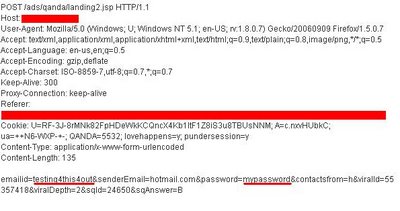
To provide solid proof for this I conducted a little experiment. For the purposes of this, my e-mail will be "testing4this4out" and my password "mypassword". I filled that info in while having a packet sniffer running in the background. The result? As soon as I clicked the submit button I got the following screen in the sniffer...
To conclude, I find it preposterous being asked for my password by a third-party. Moreover when that party does nothing to protect such sensitive information. It seems that we have to look out for ourselves and be constantly on our toes to avoid, the least, an unpleasant situation.
It was then that the website asked me to enter my hotmail login and password!!!
The idea was good I guess: they wanted access to my hotmail address book so that the poll I had just created would be forwarded to all of my contacts! Let's say for a moment that spamming my entire address book is ok.
But asking me for my password? What assurances do I get that they will not keep it in some database? I mean giving away my password is a pretty stupid thing to do. The official hotmail services will NEVER ask for it. It may seem convenient to automatically get the e-mail addresses but at what cost?
Anyway, let's say that I am not the least bit suspicious about this and believe they will not store or use my password against my will. Here comes insanity number 2!
The session was not encrypted! No SSL! No nothing! Do you know what that means? The password is transmitted to the server in plain text! That's right, your hotmail password (along with the username) is transmitted from your PC, over a dozen Internet hops and to the server. Anyone may read it in any step of the way with absolutely no effort.
So let's recap: A noname website, in order to conduct a survey among your contacts, asks for your hotmail username and password. That password grants it full access to your messages, contacts and configuration - not just to the address book. Also, that password is transmitted in plain text on its way to their server so any malicious user can read it.
To provide solid proof for this I conducted a little experiment. For the purposes of this, my e-mail will be "testing4this4out" and my password "mypassword". I filled that info in while having a packet sniffer running in the background. The result? As soon as I clicked the submit button I got the following screen in the sniffer...
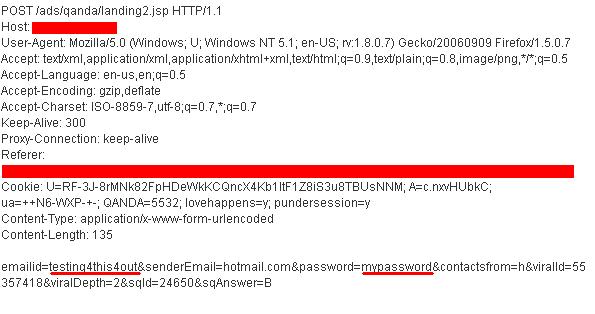
(If it's too small for you to read, click on it and you'll get the larger version)
As you can see, my e-mail and password appear before you. If this was real life, I would be totally compromised. End of Story.
As you can see, my e-mail and password appear before you. If this was real life, I would be totally compromised. End of Story.
To conclude, I find it preposterous being asked for my password by a third-party. Moreover when that party does nothing to protect such sensitive information. It seems that we have to look out for ourselves and be constantly on our toes to avoid, the least, an unpleasant situation.
Saturday, September 16, 2006
Wireless Security Revised
 There have been talks and talks about Wireless Security but what does the average user know and, more importantly, what does he apply?
Last night I logged in a popular technology forum. It's one of those places where users talks with users and help each other.
A while ago there was a talk (in another forum) I participated in which examined whether forums are the new generation of information or just Unreliable Gossip 2.0. From one point of view, forums allow and promote freedom of speech. Anyone from anywhere may say what he/she has to say. No borders, no boundaries and no censorship. On the other hand, that uncontrollable model of information is susceptible to the "psychology of the group". This means that rumors can easily spread, facts can be twisted and ultimately have dozens or hunders or thousands of people misinformed (I might say deceived) just because "everybody else thinks so". That's the problem right there.
When it comes to critical user-to-user advice, how sure can one be he's getting the right info?
Now, let's get back to the popular technology forum and yet another Thread on Wireless Security. A lot of people in there consider WEP secure, some suggest disabling DHCP and applying a hidden SSID setting and the majority considers MAC Filtering as an effective action. Of course the above will only keep out of a Wi-Fi Network users with the same intellectual level as the ones proposing them. Then again such users don't attack other networks. If they are lucky, when they turn on the computer, it will automatically associate to a network and get an IP through DHCP. Determined attackers on the other hand may penetrate these protective measures in no time.
That's why I consider these tips more dangerous and harmful than any malicious hacker.
The reason is they provide a false blanket of security. Most of these people think "if user1 and user2 suggest them, it's ok". Then, these people, when asked by others to contribute, will replay the same false information as if it was their own, completing an endless loop. Finally a more literate user mentioned WPA/WPA2. That's pretty good unless you use a common dictionary word or name as your Pre-Shared Key.
To sum up, it has been my intention to illustrate the present situation among "user communities" on (wireless) security issues. I would never trust (or at least accept "as-it-is") information from Bob235 or PurpleBeast (the names are fictional), why would you?
Subscribe to:
Posts (Atom)


