Sunday, October 29, 2006

One click away from doom

Recently I caught my self observing various high-level graphical interfaces used in web services. All of them were custom-made solutions made by small companies yet used by large organizations and universities. In most cases they try to save some money. That's quite a big mistake since large-scale commercial applications have been tested and are supported by entire groups of programmers. On the other hand, something your local two-man dev team will present will be buggy and incomplete and the drill always has to do with the programmers standing by the client and fixing stuff on the fly. In the end, the result will be something that "just works".
How about quality of service?

I would like to go pass the bugs and focus on usability. Many times two buttons are placed next to each other: one commonly used and a very "dangerous" one like "delete" or "submit". I mean it is a matter of time before some user "misses" and clicks the wrong button. Why? Because someone tried to get the "cheap" solution and look good to his boss.

To a certain extend I understand the guy who made it. I am a programmer myself and don't pay much attention to design (and GUIs in general). On the other hand, I would never choose my self to develop from scratch something big and important because I know I would make mistakes that have already been done and would ignore certain things that have already been pointed out. Nobody can know everything. One must be wise enough to make that call while discarding any influence coming from his ego.

I am thinking about the guy who decided to hire a local crew to do the job. Obviously he doesn't understand much about the job to be done. Probably he is some financial analyst with no idea about computers or software. I bet he has never written a single line of code. Because if he had, he would know that all he did was undermine the entire group of people that would have to use the system. He has one chance to bring in a service and he made the wrong choice. It'll be another 10 years before the system is revised and even then it is doubtful whether they will replace it or not.

In the end of the day, it is these things that make the life of computer users harder and therefore enhance the myth that "these damn PCs are a pain in the neck. We would be better off without them".

Friday, October 20, 2006

Think Big, Program Less

Today I was programming an indexing application in Java. It starts from a specified path and creates a Hash table with all files in that path and all folders underneath. Its purpose is to find duplicate files even if their filename is different. The code is pretty simple but I made one critical mistake: I didn't stop and think how my procedures would behave in a large scale. That cost me about an hour of debugging (more like my head banging against the wall).

Here is the problem: Although the code is correct, it recursively does it all in a single method. This means the Garbage Collector, Java's memory freeing mechanism, won't do anything until this entity is no longer in use. As a result no memory is being freed during the application's operation. This is very hard to notice when using small files as a test bench but what happens when you have to index a couple of dozen of gigabytes? I'll tell you what happens: withing the first seconds of runtime, the application consumes all available memory and the Virtual Machine crashes. If you feed (the beast) with more memory it will simply grow bigger before crashing but will never finish. Only if you could provide virtual memory equal to the total size of the files to index, the application would complete its job but that's impossible and of course a very very very very very very bad idea!

The solution: design a new method explicitly for hashing the files, one at a time. So for every file, you invoke that method, load its contents in memory, digest them, unload the method, release its contents (for the appetite of the Garbage Collector) and return the result. So simple! And again let me stress out that the unsuspected developer would consider the two approaches as equal.

I was pretty sure my application would work the first time and was about to release it through my web site when, just for the fun of it, decided to check out if I had any duplicate MP3s. Out of pure luck I discovered that my code would behave very badly (or if you like, would not behave at all) under real-life conditions.

What I've learned from this is to think out of the box (at least try) and try different angles when designing something. My point of view may be entirely different that yours and I have to take all factors into account if I expect my programs to function properly in systems besides my own :)
Oh, there's another useful point that comes out here: you may be using a high-level language but you must never forget your computer's architecture and capabilities. In this case, don't forget about memory management just because Garbage Collector does it for you.

P.S.: This reminded me of a major bug caused by the overflow of a common “int i” temporary variable in an “average number calculation” implementation. I remember pointing out that certain programming “habits” should be revised to avoid (at best) the embarrassment. You can find the story here.

Tactile Passwords could strengthen our security

There's an interesting article over at NewsScientistTech on "Tactile Passwords", a user need-to-know authentication method that relies in the sense of touch. This means that one doesn't have to type in or pronounce a string of characters or numbers, just remember a tactile pattern (or sequence of patterns) and select it upon challenge by a security system.

In detail, Braille-like devices (already employed by visually impaired people) are used to carry patterns to the user's fingertips. Then, the user must click (or somehow select) the ones corresponding to the unique sequence he was given by the Certificate Authority. It's like the machine is asking you "Is ABC your password?" and if it is, you answer "Yes". This may seem stupid at first sight but think about it.

No sensitive information is exposed on a screen or keypad but tiny pins under your fingertips, which only you (the person in contact) may feel and "read", perform the authentication process. Of course the sequence of patterns is randomized each time but that's a detail.

I believe this is a very interesting idea when it comes to safeguarding a critical point in user authentication: the one-factor (aka password) policy. Every time you type in your ATM PIN code or any other code for that matter you shield (or should do so) the keypad with your hand. Why? Because anyone standing behind you could see what you are typing. This is the same reason asterisks, instead of the actual password, appear on the screen. "Shoulder-Surfing" is a big headache to security experts. Could this be the end of it?

Of course I, being a little more paranoid, believe that any place where some stranger may stand behind you while typing a PIN code is not a safe place. He can always stick a weapon in your back and force you to type the correct code. As you can see, if you have to worry about someone observing your actions, you have to worry about even more serious things. Anyway, just giving some food for thought.

P.S.: If you can't picture the tactile authentication devices, check this out. It looks like a common mouse, doesn't it? :)

Friday, October 13, 2006

Who's messing with my mail?

Everyday I see mailing lists that allow uncontrolled (un)subscription. That means that all you have to do is type in your e-mail address to join/leave that list. Why is that wrong?

Because if you know a guy's address you may subscribe him to spam/porn/etc lists despite his will. You don't get much profit out of this except the fact that you make his life a little bit harder (sorting out the spam). For example I beginning to believe that someone is giving away the list address of an academic class I am attending (the teacher is a pain the neck and many of his students would like to get back at him). Also, if you know that someone is subscribed to a usefull (to him) list, you may unsubscribe him at any time, preventing him from receiving future updates and news.

It's like someone can subscribe you or rivert/cancel your subscription to a magazine or, worse, divert you bills so that you never receive them and therefore never pay them. As you can see, it IS a big deal!

All mailing lists should provide a verification link/code every time you try to add/modify/remove an entry to their system.

Tuesday, October 10, 2006

dodgeit.com: Beat 'em in their own game

Having an e-mail account is common these days. In fact, most people have more than one. So, there is a tendency among web sites to ask for your e-mail in order to track you down somehow or keep statistics of their own. For example, wanna download sth? give us your e-mail! This doesn't seem so bad at first but wait a minute! Giving away your address lets them know where they can reach you. And unfortunately a great deal of them takes advantage of that. For starters they decide to subscribe you to their mailing list, sending your their daily or weekly newsletter. Others sell your address to marketing firms which in turn use it to promote their customers' products.

In the end you end up with a dozen or so e-mails a day in your Inbox that you don't care and never asked for. What can you do?


Well, there yet another solution to this: dodgeit.com

Next time you are asked for your e-mail, give a random blabla37@dodgeit.com. No registration required! After that, visit dodgeit.com and check your e-mail (still without any registration or password). Pretty cool, huh?

Another interesting aspect of this: can you think of common usernames other people would use? Like nobody@dodgeit.com or person@dodgeit.com, etc? Try entering some of them in the site and you'll get a list of the e-mails these people got. So next time you register to a forum or sth, use a hotmail/gmail/yahoo account instead!

Thursday, October 05, 2006

Dominos GR: Anonymous Pranks Inside!

It is a common prank to order pizza for someone else by forging their id. All you have to do is give the other guy's name and address and only imagine his surprise when he opens the door to find the delivery guy holding 5 extra-large pizzas. Of course pizzerias use caller-id to avoid taking orders from third-party numbers. So far so good.

But here comes the Internet to spice things up! The greek branch of Dominos, located at dominos.gr, let's you place online orders using a pretty lame authentication system. All the users have to enter, is their phone number and street number (just the number not the street name). The first time you order, you have to do it by the phone so that you provide all your details. The second time though, by entering your phone number in the website form, they pull your record and carry out the order. In fact the online accounts use the same database as the dial-in customers.

Do you see the problem here?

If I know a guy who orders from dominos (he doesn't even have to order online) I can easily lookup his phone number (courtesy of the national, public phone records) and his address. So I can bill him with a dozen or so pizzas. The advantage against the original phone prank is that in this case I cannot be traced! Whether I am using a dynamic ISP IP (the records are classified and no warrant will ever be granted for that purpose), a public hot-spot or Internet cafe or even Tor, I pretty much stay under the radar.

I don't get these guys. The information they need to log you in is public domain! Anyone, anywhere, at any time may access it, copy it and use it freely. How about that? LOL!

Wednesday, October 04, 2006

Yahoo Redirection Hole Exploited by Phishers

Every day I get quite a few spam e-mails. Normally I just delete them but today I'm in an investingating mood :)

So, I got this message titled "eBay Member" from "aw-confirm@eBay.com". First of all, I took a look at the header to find out it had been sent through a german gateway. Why would the famous online auction site stationed in the U.S. use such a server? It wouldn't!

And of course there was a link (hidden under HTML) pointing to


If you visit that pretty long and suspicious link you get a web site just like the eBay.com login page only the SSL icon is missing. And this is because only the original site is in possession of the certificate.

Anyway. Last month I talked about a google redirection hole but then again almost all search engines suffer from similar exploits. Yahoo is one of them. The question is what can we do to fill these holes while preserving the freedom of information and user-friendliness of the service.

Finally, one thing that keeps us somehow safe from phishers is that everybody speaks greek and all these e-mails are in english so in the majority of cases you have no business with a foreign service and disregard it. I could only imagine what would happen if they were written in our native language.

Monday, September 25, 2006

Leaking your info on the net...

It's been 8 years since I purchased Windows 98. At that time I felt really good about my self buying an "advanced Operating System". Of course later I realised I had payed for something that didn't work well most of the time. Anyway, I was living the dream. I was the proud of owner of Windows so I had no second thoughts entering my personal information during the Installation.

Not long after that I found out in horror that web pages could read that information and store/forward them. How did they get that? Well, I started finding cookies in my hard disk titled "firstname.lastname@domain". That's right. It was courtesy of Microsoft :/

Every time someone asked for my details, Windows kindly provided them! At no time did I receive such notification or warning. My name, address, phone number etc where transmitted transparenty to the web.

I remember immediately formatting my hard disk (which does not wipe out sensitive data but at least renders them inaccessible to Windows) and installing the OS under a fake name. I, the legal owner of an overpriced OS, had to forge my identity to ensure some, partial anonymity.

Since then, I developed a fear against entering my name anywhere. Privacy statements go right out the window for me. Whether it is a well-known web site (companies, service providers) or a no-name one, it's one and the same. I simply do NOT trust them. I am not ashamed to state so. I am not fealing paranoid. I just feal you are NOT good enough to protect my privacy. Goodbye now.

Wednesday, September 20, 2006

How friendly are "User-Friendly" applications?

Not too many years ago, computer software was just green text on a blank screen with a bleeping cursor. As soon as PCs became popular the term "user-friendly" was born and carried out by the marketing departments of software vendors. What they were trying to do is make a computer and its software more appealing to the average person: colors, icons, tooltips and helpboxes were deployed. In the same spirit, they enforced to the companies' development department an abstraction policy which kept "technical stuff" hidden so that the software users were not confused.

So far everything seems ok and the intension itself is pretty right (make PCs accessible to everyone) but something went wrong on the way. Software that keeps its technical part hidden should operate perfectly (aka bug-free) at the same time. Otherwise when you face trouble, you can't trace it back to its source and fix it/find more about it.


Today's example is Windows Live Messenger but this goes for all software that tend to be "user-friendly". I had this problem: if I chose for the program to remember my password, I was logged in but my contact list was not updated correctly. All my contacts were located under "Other Contacts" and my custom-made categories remained emtpy. I checked with my Hotmail account to make sure that my address book was in order but for some reason the Messenger could not synchronize. Then I tried removing the "remember-me" option so I had to type-in my password every time and, guess what, the synchronization was done perfectly! I mean... omg!

This behavior would stumble the average user who would just say "Windows Sucks". On the other hand, I quickly suspected that in the first case, some local caching was done (save my password, maybe some profile info and stuff) while in the second, all information was downloaded from the server. Yet I had no way of fixing this (clear the cache). At least not from within the Messenger. How friendly is that?

The programmers, in an attempt to keep me away from "technical stuff", have hidden (in fact scattered) all program files. As far as I can tell there's "Program Files", "Documents and Settings\MyUsername\Application Data" and "Documents and Settings\MyUsername\Local Settings\Application Data". Of course these folders are marked hidden so, in normal circumstances, they are invisible to you.

I had to use Tools > Folder Options to View All Hidden Files and Folders, then search my way through Application Data and find a folder titled "Windows Live Contacts". Still I wasn't sure it was the solution to my problem. Anyway, I deleted it and restarted Messenger. WoW! It seemed I'd hit jackpot! The synchronization was done therefore I had just deleted the problematic cached files. Does anything from the above seem "user-friendly" to you?


To sum up, hidding debug options and program structure from the user means you are absolutely sure about your software's well-behavior. Otherwise at least give us a chance in fixing your stupid mistakes ourselves!

Danger! DOT GR XSS Detected!

It has come to my attention that a major website, here in Greece, is vulnerable against XSS attacks. I would expect something better from these guys. That site, which I do not intend to reveal for obvious reasons, is actively present in the IT market and one would think it employeed trained professionals. Yet, right there in the front page a huge exploit relies. I haven't done any serious digging but I expect to find more oversights.

As I've written before, XSS (aka Cross Site Scripting) is happening right now while not only programmers but security experts haven't even heard of it. Eventually they'll get to know it the hard way I guess.

Monday, September 18, 2006

Gimme the address & keys to your house!

Today I received an e-mail from a friend of mine asking me to take a poll about her self ("Do you think I'm smart or do you think I'm sweet?" - Like there's no way she can be both). Anyway, I did answer (don't ask) by following a link to the poll-hosting website. After that, I thought it would be a good idea to set up a similar poll about me and send it to a few people.

It was then that the website asked me to enter my hotmail login and password!!!

The idea was good I guess: they wanted access to my hotmail address book so that the poll I had just created would be forwarded to all of my contacts! Let's say for a moment that spamming my entire address book is ok.

But asking me for my password? What assurances do I get that they will not keep it in some database? I mean giving away my password is a pretty stupid thing to do. The official hotmail services will NEVER ask for it. It may seem convenient to automatically get the e-mail addresses but at what cost?

Anyway, let's say that I am not the least bit suspicious about this and believe they will not store or use my password against my will. Here comes insanity number 2!

The session was not encrypted! No SSL! No nothing! Do you know what that means? The password is transmitted to the server in plain text! That's right, your hotmail password (along with the username) is transmitted from your PC, over a dozen Internet hops and to the server. Anyone may read it in any step of the way with absolutely no effort.

So let's recap: A noname website, in order to conduct a survey among your contacts, asks for your hotmail username and password. That password grants it full access to your messages, contacts and configuration - not just to the address book. Also, that password is transmitted in plain text on its way to their server so any malicious user can read it.

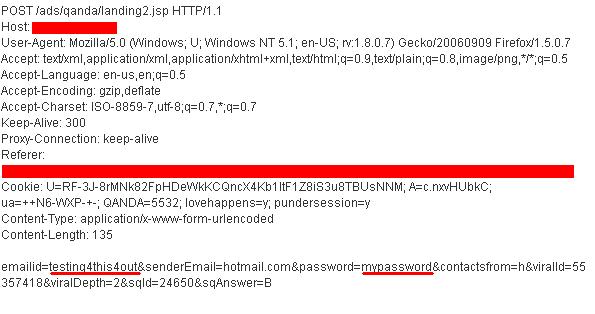
To provide solid proof for this I conducted a little experiment. For the purposes of this, my e-mail will be "testing4this4out" and my password "mypassword". I filled that info in while having a packet sniffer running in the background. The result? As soon as I clicked the submit button I got the following screen in the sniffer...


(If it's too small for you to read, click on it and you'll get the larger version)
As you can see, my e-mail and password appear before you. If this was real life, I would be totally compromised. End of Story.

To conclude, I find it preposterous being asked for my password by a third-party. Moreover when that party does nothing to protect such sensitive information. It seems that we have to look out for ourselves and be constantly on our toes to avoid, the least, an unpleasant situation.

Saturday, September 16, 2006

Wireless Security Revised

There have been talks and talks about Wireless Security but what does the average user know and, more importantly, what does he apply?

Last night I logged in a popular technology forum. It's one of those places where users talks with users and help each other.

A while ago there was a talk (in another forum) I participated in which examined whether forums are the new generation of information or just Unreliable Gossip 2.0. From one point of view, forums allow and promote freedom of speech. Anyone from anywhere may say what he/she has to say. No borders, no boundaries and no censorship. On the other hand, that uncontrollable model of information is susceptible to the "psychology of the group". This means that rumors can easily spread, facts can be twisted and ultimately have dozens or hunders or thousands of people misinformed (I might say deceived) just because "everybody else thinks so". That's the problem right there.

When it comes to critical user-to-user advice, how sure can one be he's getting the right info?

Now, let's get back to the popular technology forum and yet another Thread on Wireless Security. A lot of people in there consider WEP secure, some suggest disabling DHCP and applying a hidden SSID setting and the majority considers MAC Filtering as an effective action. Of course the above will only keep out of a Wi-Fi Network users with the same intellectual level as the ones proposing them. Then again such users don't attack other networks. If they are lucky, when they turn on the computer, it will automatically associate to a network and get an IP through DHCP. Determined attackers on the other hand may penetrate these protective measures in no time.

That's why I consider these tips more dangerous and harmful than any malicious hacker.

The reason is they provide a false blanket of security. Most of these people think "if user1 and user2 suggest them, it's ok". Then, these people, when asked by others to contribute, will replay the same false information as if it was their own, completing an endless loop. Finally a more literate user mentioned WPA/WPA2. That's pretty good unless you use a common dictionary word or name as your Pre-Shared Key.

To sum up, it has been my intention to illustrate the present situation among "user communities" on (wireless) security issues. I would never trust (or at least accept "as-it-is") information from Bob235 or PurpleBeast (the names are fictional), why would you?

Friday, September 15, 2006

Detecting Tor

Talking about Tor with RSnake has produced some interesting points:

First of all, the use of Tor can be detected. In detail, Privoxy - a proxy working with Tor to provide web surfing anonymity - tends to block certain website elements that may blow a user's "cover". Such behavior can be monitored by a website to determine whether a visitor is under a cloak of invisibility or not.

Also, as pointed out, Tor network uses the domain extension .onion (like .com). Of course that is inaccessible outside the network so there you have it, another detection way. If such page gets a hit, the user is using Tor. Of course the user's anonymity is not compromised in any way since one can never be sure about the given IP. Yet this method is a potential tool for content providers who aim in restricting access to identifiable users.

Tor still remains one of the best ways of operating in insecure networks.

Thursday, August 24, 2006

Windows: Vulnerable by Design

I'm coming around one of my (and probably your) favorite subjects, Windows and Their Evil Nature. Talking about this OS and how it is so insecure is one hot topic. It's just I've never sat down to write a few pointers on the subject. And guess what! Tom Yager in InfoWorld has done it for me. Oh boy!! Anyway :P

Just a few quotes from the article...
  • All Windows background processes/daemons are spawned from a single hyper-privileged process and referred to as services.
  • By default, Windows launches all services with SYSTEM-level privileges.
What this means is that if an attacker finds a flaw in a Windows process and manages to inject code, it will be executed with SYSTEM privileges. Bad bad thing! Btw, do you know the average number of flaws/bugs per line of code? Google it and you'll be surprised with the answer.
Another thing I'd like to add is that all these high-priviledged services are running by default in any system. What this means? That all of us have more that a dozen running services which we will never need but at the same time pose a great security risk because of a potential exploit in them!
  • Windows requires that users log in with administrative privileges to install software, which causes many to use privileged accounts for day-to-day usage.
This is so common that most of you think of it as standard. No! Using your computer with an administrator account is also a bad bad thing. Why? Because if malicious code is executed somehow in your account it will have admin rights and believe me a large (maybe the largest) portion of malcode needs these rights. You think you are smart enough? Think again. I am not talking about clicking .exe files sent to you over IRC. I am talking about XSS running javascript, remote code execution exploits and many more. Even a simple .bat written by some brat with cp and rm commands aiming to mess up your system. Unfortunately if you switch to a user-level account you will feel disabled most of the time. Well you shouldn't be.

I could talk about these things for days but I guess it's a good time to stop now, just for today. If you find these interesting go on and read the article.

Oh, Slackware >> Windows :P

Wednesday, August 23, 2006

Public Web Surfing

The New York Times has an article on safely using public networks (e.g. Wi-Fi hotspots) or public computers (e.g. at an internet cafe or airport). The author points out that most users leave too many traces behind them after using their computer in a public network or using a public computer. These traces may be from browser cookies to passwords and work documents.

It is true that most people are just computer users meaning they don't know and don't care about technical issues, including security. So someone is on the move, wants to check his/her e-mail or contact a friend, connects to a hot spot or visits an Internet cafe. In any case, malicious people could "snif" what he/she does and steal almost anything this user sends or receives.

Of course there are many things one can do to protect him/her self. Everything has to do with attitude: First of all more and more people have laptops so using a public computer is rare. Yet, if you ever need one, keep in mind that it's like talking on a public phone in the middle of a square. Would you yell your ATM PIN over the phone or your e-mail password? No! Hell, No! The same rule applies here. When typing in passwords *always* make sure you are using SSL. If not, just quit. The problem is someone could plant a keylogger in that public PC and collect tons of information. For that reason these PCs are restarted between different users and any specific user-specific programs or data are wipped out. But you can never be too safe so consider public PCs the last possible solution. When using your own laptop you are at least safe from malicious programs. Eavesdroppers do exist though. Check here too for SSL and don't even think about logging in otherwise.

Go ahead, check the article. The author tries to ring the bell to those who are totally unsuspected of the potential dangers but may end up scaring them into ineffective techniques which only offer the illusion of safety. Another point I disagree with is the listing of "security tips" like encryption software and VPN. As I've just said users who don't know how to deal with this stuff are likely to a) lock themselves out of important files b) use a VPN in such way that no protection is provided c) get tricked too easily.

To sum up, public web surfing is certainly a great service allowing you to talk, work, have fun while on the move but, as any public means of communication, should not carry sensitive information. If that is absolutely necessary, there are ways to ensure privacy. The thing is that Security Policies and Techniques for "Private Public Web Surfing" should be applied by trained professionals and not layed upon the hands of ignorant users.

P.S.: To read the article you'll be prompted for a username and a password. Since registration is free I don't see any point in this. I mean they restrict access to registered users but then again, anyone can register! So why not leave the access totally public? Anyway, use goaway147:goaway as username:password (thanks to bugmenot.com).

Tuesday, August 22, 2006

Google Redirection Hole used for Phishing

It's official. Google's redirection hole, formerly used for spam, is currently an excellent tool in the hands of phishers.

Why is this bad? Because 99% of Internet users trust google and when they see a link starting with "www.google.com" they think it's part of google or a site google knows about and has included it in its structure. WRONG!

What do I mean? Check this out...


This url (one line) starts with one of the most recognizable domains in the world but what comes next? An unverified IP address and after that the words "signin" and "ebay". Just for testing, try opening it with your browser. It's safe from javascript and stuff. It's just an example. Or try this: append a url of your choice next to "url?q=" and paste the entire thing in your browser. WoW.

This is a huge hole. Anyone can have google as his referrer to a malicious site. Just for the sake of it try entering the link from above (if you haven't done already). And open another tab in your browser with the real signin page from ebay.com. Can you tell the difference? An experienced (or suspicious) user might notice there is no SSL established in the fake page but that's something most victims don't even know about.

Oh and by the way this issue has been known for over six months :P

Sunday, August 20, 2006

How To Write Unmaintainable Code

Following BOFH guidelines demands a little bit more than writting code without comments. In this must-have guide you will learn essential tips in making a code maintainer's life a living hell. It will also guarantee you a life-time contract at your job since no reasonable man will kick you out and except their software to keep running.

Saturday, August 19, 2006

Next Gen Search: Photo ID Lookup

Every time you add a picture to your gmail contact's profile, you are asked to crop it to seperate the face from the body. So Google has, somewhere, a huge database with people's headshots tied with nicknames and other information. I wonder why...

Now hear this: Google was very close in acquiring Riya, a face recognition service which expanded into a visual search engine. The deal broke since Google decided to develop an in-house solution. This prooves their intentions in developing algorithms for processing and recognizing faces.

How about that? You enter google.com, search a name/nickname and download the guy's/gal's photo. Another scenario describes you taking a photo with your digital camera/cell phone, uploading it to the search engine and identify the displayed person. OMG. This is just huge. What's next? License plate identification?

Of course there are serious legal implications mainly from possible privacy violations.

To sum up, from a technological point of view this is very big (of course intelligence services have been using this thing for a decade now) but we should give it a good thought before launching it as it is. Besides, Google is already under suspicion because of its search engine (keeping user search entries) and its mailing service (filterning e-mail content to extract information). Finally, all this huge amount of data is becoming an invaluable source which is yet to be mined.

British Terror Alert by Hollywood Inc.

You must have already heard about the "terror alert" issued by British law enforcement authorities, followed by "imminent attack" countermeasures such as grounding all flights, strip searching all airport travellers and of course banning all liquids (including medicine, water and baby milk) from entering the flight cabin.

At that time, the brits claimed they had "intelligence" on a large-scale terrorist attack which involved mixing certain chemicals on board and causing explosions that could bring down an entire airplane.
Authorities were in true panic since the same "intel" stated that those chemicals could be found in every-day products such as cosmetics and cleaning products. So no liquids on board and if you absolutely had to, you were forced to taste them.

Since the beginning of this I trully believed they were at least overreacting if not playing some propaganda game. Now, The Register has an interesting, detailed article which prooves all these police claims wrong and concludes that this scenario could only be implemented by Hollywood producers in the land of fiction.

Friday, August 18, 2006

Cracking some, Securing others...

It seems that I am spending too much time and energy talking about stuff in other blogs that I don't take care of my own. Well, I'm not sure anyone else is reading this anyway so I guess it's cool :P


You VS Phishing

To begin with, here's an interesting post on managing security between producers and consumers. It is about Phishing and how it is certain that anything a user has to type in as authentication can be extracted from him/her one way or another. What security experts should be doing is stop trying to educate the users and start increasing security on the company's behalf. Social Engineering (that's what phishing really is) manipulates people and that is something we cannot deal with once and for all. And since we acknowledge that the weakest link is always the human, our efforts should focus on taking him out of the equation.


Yet Another XSS Issue

On the XSS frontier, according to this it is possible to enter specific ASCII characters in some web page which, when next to each other, form expressions or delimiters that can shape the code underneath. That way a user entry may place malicious code outside an tag but withing the realm of the HTML tag. This is so crazy my head is going to explode. No, it's not because I find it difficult to understand or anything. It's just that this stuff attack technologies like HyperText Media Language that are considered above suspicion and are widely used. Exploiting this automatically produces a number of victims equal to the Internet population.

So... let me get this straight, a problem so big that can affect the entire Internet but so obfuscated that cannot be seen and if seen cannot be realised. Everyday activites like opening HTML encoded e-mails or hitting a URL may expose the world to malicious attempts. And we are still sitting here?!


Smashing the Flash for Fun and Profit

Last night I was really bored so I decided to study a few flash games and find a way to cheat when submitting the score online. It really was easy. What most of these games do is send a POST to e.g. http://www.example.com/flashgames/game314/submit.asp?score=31400. If you manipulate that packet, changing score to 62800 and finally send it, you have successfully doubled your score! No verification, no nothing. Of course some games do a little checking to see if let's say 62800 is a plausible score (maybe it exceeds the maximum available points or sth). But that's also too easy to deal with.

You just have to decompile the file and take a good look at the source code which is ActionScript. To begin with, all flash games (.swf) are downloaded to your PC prior to execution so you have a copy of the title to look at. Secondly, since they are not compiled files but use an interpreted object-oriented language they contain bytecode (not machine code) which is executed at run time by your browser. That bytecode may be easily reversed using a decompiler (it actually doesn't de-compile but you get the picture). Finally ActionScript seems like pseudo-code, that is logical expressions describing the actual design of the game. These can be well-understood by humans, even non-programmers. To deal with these issues, protection methods are being used. These allow the game to be run but prevent a decompiler from taking it apart. But the truth is these protections aren't that good. They can be removed using freeware, google-found tools. Finally, ActionScript programmers use obfuscation techniques to protect their code (all other elements like graphics are left open to "borrow"). What they really do is piss somebody off since the code may be partly read using certain ways and ofcourse the code structure may always be studied using standard Hex Editors.

Since yesterday I've seen quite a few flash games with variable protection schemes. The hardest I've found used the hash of string containing the actual score plus some "secret" sequence of chars to make sure the submitted score had not been tampered with. This sequence was hard-coded in the game. I mean are they stupid or what? As I've already said, if someone is already skilled to discover the submitted values and crack the file, code obfuscation can do very little to him. So sooner or later the secret is revealed.

There's one golden rule in cryptography:
never rely on the secrecy of the algorithm
.

Once the algorithm is revealed, your cover is blown. I could think of and suggest ways to improve verification issues and protect copyrights but that's not my job and I have better things to do :P


e-Shops revised

Almost two weeks ago I ordered a digital camera from a popular, computer/technology store which also operates online. The same day I received an e-mailing informing me that the specified product was out of the stock and urging me to contact an employee by phone. So I did. He claimed that a "bug" in their website showed the camera as available "withing 24 hours" while they had already filled an order from the manufactor some days before. OMG. Do you say the words "bug" followed by "website" and expect someone to shop from you again? Anyway, I made clear that no charges would be made until the product had been shipped to my location. Standard thing I guess, nothing to get excited about. Today, I called the store asking for a status on the order. "We received the items yesterday and they'll be shipped to you tomorrow". Am I missing something here? What happened to "today"? What are they going to do today? Or maybe my call was a wake-up for them to check on my account? So weekend is coming up and I'll get my package on Monday (hopefully).

Come on people! Is this the best you can do? It's the summer time and I'm a bit lazy. Had it been otherwise, I would have already canceled the order and bought the camera from somewhere else.

What these people don't seem to understand is that when you go online you are competing with the world. Thousands of e-Shops are available online providing low prices, high availability and excellent service.

Had it been otherwise, I would have already bought the camera from a country "next-door" like Germany or France. Using today's courier services I could have the product here in two days and at a price possibly lower that the one I get here.

In an open market my shopping mall extends around the world and those who stick to "standard" services won't make it through the year.